Tapas announces a new incubator program
Tapas has announced a new incubator program. It has a lot of webcomics newcomers starry-eyed.
Let’s drill down on some details.
The content you are trying to access is only available to members.
Tapas has announced a new incubator program. It has a lot of webcomics newcomers starry-eyed.
Let’s drill down on some details.
The content you are trying to access is only available to members.
I have to admit, I was captivated by their Facebook ad. Ripl offered an easy way to create animated posts for social media. The examples were swank, and the promise of increased social-engagement was too good to pass up.
I was disappointed by the results.
The content you are trying to access is only available to members.
A special thank-you to Philip M. Hofer, “Frumph,” for walking me through this process.
It’s no secret. I despise some of the default navigation buttons that are included with webcomic CMS packages. The ones (as seen on the right) that come with ComicsPress are especially high on this list.
Personal aesthetics aside, using the default buttons kinda makes your site look like every other webcomic. It labels you as generic. Making your navigation buttons fit the look of your Web site is the first step towards separating yourself from the pack.
Although these instructions are written with Comic Easel in mind, I’m assured that the instructions are directly transferable to ComicsPress users.
To create your own set of navigation buttons, you may want to consider copying a current set. They are located in the /wp-content/plugins/comic-easel/images/nav/ directory. Drag a copy of one of the folders to your desktop. Open the image files inside the folder and redesign them to fit your site’s look. (But first, read the rest of these instructions!)
Along with the image files, each folder has its own navstyle.css file. This CSS file has all of the information inside of it which determines which graphics to use and how the buttons display on the screen.
Open one of the images and look at it. I’ll use the “previous” arrows from the Box button design as an example.
Note: this is a PNG file with a transparent background.
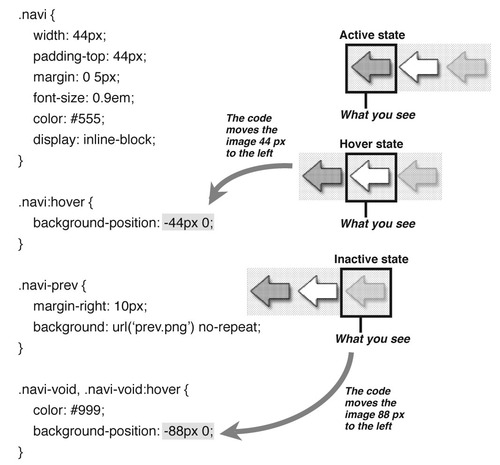
Notice that there are three different image “states” inside of a single image file.
The navstyle.css file takes this image file and moves it back and forth to display the portion of the image that corresponds to the state (active, hover or inactive). In our example, the button displays in a 44 x 44 pixel area. The image file is 132 pizels wide (and 44 pixels deep). Here’s the code that does it:
In the above navstyle.css, “.navi” is the element that contains the base information that is used in all of its states. This element contains the height and width along with other information on how the the button is displayed. The .navi-hover code moves the image 44 pixels to the left. The .navi-void and .navi-void hover code moves it 88 pixels.
Once you’re happy with your new buttons, you’ll want to upload them to your Child Theme folder — not the folder you originally got them from!
When customizing your own set of buttons, you can use whatever height and width you want for the buttons, but remembering to alter the code in the .navi portion of navstyle.css to reflect that change. The .navi-void and .navi:hover numbers will need to be changed as well. For example if your new buttons are 50 x 50 px, the image itself will need to be 150 x 50 px (width x height), then the .navi:hover will then need to be -50px instead of -44px, and .navi-void needs to move 2 states over so it needs to be -100px.
The comic navigation widget will only work inside one of the comic sidebars:
I saw significant uptick in Patreon backers whose payment came back with the Fraud tag this month.
Luckily, we’re all pretty creative people, so if we can get ahead of the curve, perhaps we can nip this in the bud. So let’s start brainstorming some proactive measures. I’ll offer a few to start things off…
The content you are trying to access is only available to members.
We’re well into the second half of the year, believe it or not. Now’s a great time to start planning the rest of your 2017.
The content you are trying to access is only available to members.
This is the first of a series of Hot Seat critiques in which we’ll be discussing members’ Patreon outreach. First up…
The content you are trying to access is only available to members.
Patreon’s header image gets sliced and diced more than Wolverine’s keyboard. It gets re-sized depending on the monitor-resolution of the person visiting your Patreon page, and it gets cropped ruthlessly when you post a link to your page from Facebook or Twitter.
When Patreon updated its site layout, it introduced some dead zones into the header. And, to be honest, Twitter has been showing the header preview more similar to Facebook’s presentation. So, an update has been long overdue.
So here’s an updated Photoshop template to help you make the most of your header.
The content you are trying to access is only available to members.
It sounds like a weird webcomics riddle, doesn’t it? “When is a complaint actually a compliment?” After all, as webcartoonists, we’ve always prided ourselves one the granular level of interaction that we maintain with our readers. Both the original “How To Make Webcomics” book and the updated version, “The Webcomics Handbook” devoted an entire chapter to it. One could argue that it’s a definitive feature of webcomics.
So, it stands to reason that when readers complain, we webcartoonists become very concerned.
And we do — we should.
Except when we shouldn’t.
Here’s what you need to understand…
The content you are trying to access is only available to members.
I see this advice getting passed around on Facebook quite frequently: “If you include a link to your website, the Facebook algorithm will kill your post.” Let’s talk about how accurate this advice is — and some Best Practices for promoting on Facebook.
The content you are trying to access is only available to members.
Reader surveys are an excellent way to get a better feel for your audience. Does your comic skew towards female reader? Do they tend to be younger or older? What are their other interests? would they support a Kickstarter for a new book? What rewards would make them Patreon backers?
In fact, we’ve posted a helpful DIY tutorial so you can ask all of the questions you need to ask — without paying for a potentially-expensive service like SurveyMonkey.
But what if you’re not getting a very healthy response from your readers? Should you seek out additional respondents? Advertise for more input? Solicit other cartoonists?
Be very careful, your quest for more information could result in your getting very, very bad information. And that’s downright dangerous. Here’s why…
If you feel the need to solicit feedback — beyond the readers of your comic — because you’re simply not getting a high volume of responses from your readers, then you’re already getting all the information you need about your comic.
And it spells out some pretty grim news.
You have a very small readership and/or those readers aren’t very emotionally invested in your comic.
Your work is cut out for you. You need to figure out why your comic isn’t generating more traffic and/or more-invested fans. Here’s a good place to start.
To make sure there’s no confusion, you should definitely be promoting your survey in all of the places your readers are likely to find it. These places include your website and your social-media feeds. Promote in these places early and often.
Recently, I saw a webcartoonist post a reader-survey solicitation on a social-media group for webcartoonists. After general demographics, the reader survey boiled down to one important question: “Would you support a Kickstarter campaign for a book?”
Why would you solicit feedback from a bunch of people who (likely) have not read your comic — or, at best, took a cursory glance at your site? It seems to me like this would be a great way to get incredibly misleading information.
Their response was that getting additional sources of information would yield a wider range of views — and that the views of fellow creators would be particularly useful. Wrong answer. I tried to explain why:
That is, of course, your choice. But you’re generating useless information.
Take gender, for example. It would be very useful to know if your comic skews towards one gender over the other. But, in asking us [fellow webcartoonists] to participate, you’re not going to get an accurate sample. [Because WE are not your readers.] Worse yet, if you were to actually use the data to base important decisions on, you could be leading yourself astray.
The Kickstarter question is even more problematic. When a reader says they would back a Kickstarter, it’s a potential pledge. When a colleague says they would back a Kickstarter, it’s purely theoretical — “I would back it if I were a reader… which I’m not.”
And that could lead you towards a Kickstarter campaign doomed from Step One.
Bottom Line: You’re not doing yourself any favors.
The cartoonist insisted that since this was just one part of a larger information-gathering endeavor (yeah, right), that there was no problem introducing non-reader input into a reader survey.
You can lead a horse to water, but you can’t make it think.
I left the matter there because — honestly, I’m not invested in whether that comic succeeds or fails. I feel responsible for offering some information when I see someone doing something that’s liable to screw them up, but I’m not responsible for saving them from themselves.
However, I am responsible to share information here with you — and to make certain that you’re able to use that information to the best of your abilities.
To that end, let’s make it perfectly clear: