I've been writing longform comics on the Web for ten years. Building and maintaining my audience requires a consistent posting...
Read More



Convention safety
You don’t need a subscription to read today’s post!
This post originally ran Sept. 2013. If you’ve ever been curious about the kind of information, tutorials and advice that you’ll get as part of your subscription to Webcomics.com, this is a good example.
If you’d like to join the site, you can get a 12-month subscription for $30 — or you can get a one-month Trial for $5 … with no obligation after your 30 days expire. For less than three bucks a month, you can get a steady flow of information, tutorials and advice targeted towards your webcomic business — plus a private forum to discuss issues with other professionally minded cartoonists.
When I saw this, earlier in the week…
Some dickhead snuck into my friend’s booth during Awesome Con and made off with her cash box. It was mid-day Sunday so they got everything.
— Rafer Roberts (@plasticfarm) June 1, 2015
The cop who took April’s statement said that a bunch of folks had gotten robbed during the show. He’d been taking statements all day. — Rafer Roberts (@plasticfarm) June 1, 2015
… I knew what I’d post for the next subscription-free Archive Dive. It’s this post from Sept. 2013 that shares some important safety advice for exhibiting at conventions.
I was exhibiting in Artist’s Alley at Baltimore Comic Con this weekend. Sometime Sunday afternoon, my neighbor, a novelist who was working one of his first comic conventions, suddenly made the realization that his money bag — containing his entire revenue for the weekend, had been stolen. He had set the bag on the table as he was making change for a customer, and, after trying to make change for the next customer, realized that the bag had been lifted.
We tend to get so caught-up in the camaraderie and fellowship of a comic convention that we tend to forget that there are always a few bad apples in every bunch.
So I thought this might be a good pace to assemble some tips for preventing convention theft. I’ll start with a few of my own. Feel free to add to the list.
Nobody puts their stuff on the table. Ever
This is just a good rule of thumb.
Keep your money off the table
Never put your money box (or bag) on the table. Keep it on a chair next to you or (better yet) under the table. Make change out of arm’s reach.
If you put it on the table, it’s a simply matter for an unscrupulous attendee to set his or her belongings (a book, for example) on top of the money and then pick them both up (using his book to shield the money from your line of sight).
This is actually a good reinforcement for another convention strategy that you should get into — sales inventory. I know several people that I exhibit with who do this. They make a grid with the names of all of their merchandise going down the left-hand side. And they track the sales of these items with a simple hash mark. By affixing this inventory sheet on the money bag (or inside the lid of the money box) — and getting into the habit of marking every sale — they have an increased probability to notice that it’s missing sooner.
Nobody puts their stuff on your table. Ever
This is simply a good practice to get into in general. from the guy who sets a sweaty drink on your original art to the scum who tries to pull one of these…
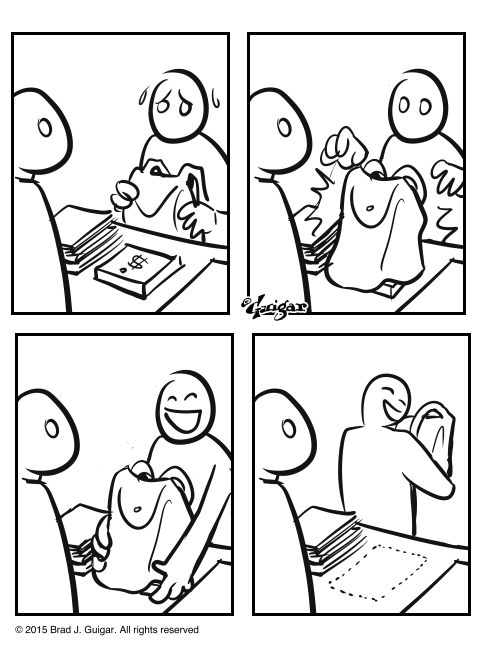
The rule is simple: No one puts stuff on your table. ever.
Don’t put all your eggs in one basket
Never keep all of your money in one place. The money box should be for collecting that day’s revenue and making change. You should have an alternate (and safe) recepticle for the money you’ve made throughout the weekend. During a lull, inconspicuously transfer some of the large bills from your money box to this secondary repository. (But always leave yourself enough $20s to make change for a $100 bill.) That would have made the difference between a nasty theft and one that wipes out you entire weekend.
Lock down your iPad
We’ve discussed this before, but it bears repeating: If you use an iPad (or other digital tabled) to process sales, be sure to lock it down.
Avoid creating blind spots
We put so much emphasis on creating vertical displays and maximizing table space that we don’t realize that we could be creating areas on our tables that we can’t see. And if we can’t see what’s going on there, it’s the perfect place for someone to swipe something off the table.
The hotel safe
I only use the hotel safe in the case of a (1) long convention and/or (2) significant amount of cash. Your money should be secure in the hotel safe. Just remember to take it out before check-out. Phil Foglio once shared a nightmarish story about being on the plane to leave San Diego and remembering that he had left all of the money he had earned through the previous week in the safe at the hotel. As the plane prepared to taxi down the runway, he was on the phone to the hotel trying to frantically explain the sutuation and see if he could rely on the honesty of his fellow human beings. Needless to say, they reported no money found in the hotel safe.
Out of sight, out of mind
At the end of the day, take everything off the table and stash it underneath. If you can’t remove it, cover it with a sheet or a blanket. Why? Because most acts of theft in threse situations aren’t pre-meditated. Rather, they’re the result of people succumbing to temptation. Take away the temptation, and you’ll be able to twart a large amount of potential theft.
No one behind the table (unless you say so)
Obviously, it’s great to have people you trust helping you behind the table. And those extra pairs of eyes are a great benefit in watching for potential wrongdoings. But unless you’ve welcomed someone behind the table, you are well within your rights to eject them from your personal space.
At the start of a convention, as I’m introducing myself to neighbors, I tell them who (if anybody) will be helping me behind my table. And I ask about their staffing situation as well. That way, we all know who is allowed behind the tables — and who’s not. If an un-introduced someone steps behind my neighbor’s table, I’m well within my rights to address them and ask them to step away. If it’s a misunderstanding, it’s easily explained. But if I’m right, I just saved my neighbor his or her livelihood.
Usually, this is a small-convention problem. There’s either a very open floor plan or there’s a lot of space between the tables. It happened to me at ConnectiCon one year, when a cheery anime fan decided to pop behind my table and start drawing in my sketchbook because she thought I “looked lonely.”
But it can be a problem at larger shows, too. I saw it happen this weekend in Baltmore. Their Artists’ Alley plan had the endcap tables moved out from the aisles on either side. This was nice because it gave Artists’ Alley exhibitors an easy entrance/exit point. However, that also created space for a fan to step into (in an attempt to get even close to the creator, I guess). And that’s a dangerous invasion of personal space.
3 Comments










 Loading ...