It’s pretty easy to see the influence of manga on comics being produced today. Scrolling through Webtoons, it’s obvious that an entire generation of young comics creators cut their teeth on comics originally made in Japan. In general, that’s tremendous! The creativity, the kinetic energy, the jaw-dropping art — it’s all worthy of emulation.
But when it comes to word balloons, something’s getting lost in the translation.
The content you are trying to access is only available to members.
This week, Brad and Dave recall a guideline for reader retention from the early days of webcomics that’s a relevant today as it was then — the 8-Pages Rule.
Beginning cartoonists often ask what size they should make their comic. Many are looking for “standard” sizes. The answer is a little more complicated than you’d expect — and it means focusing on what’s really important about the comic you’re doing.
The content you are trying to access is only available to members.
A fellow creator once shared that they were told that a comics page should have between 4 and 7 panels per page. Not only is this bad advice, but it removes the focus from where it ought to be.
The content you are trying to access is only available to members.
I polled my Patreon backers, and I asked them one simple question: How did you find out about my Patreon? The answers were surprising to me, so I made the poll ongoing — making the question a part of the welcome package that new Patreon backers receive. After several months of collecting data, I’d like to share my results…
Surprisingly, the vast majority of my Patreon backers are discovering my Patreon content through my site — and not through social media. (Although you could argue that come of them discovered the site itself through social media.) As much as I’m a proponent of publishing through social media, this is a strong argument in favor of continuing my efforts on my own site as well.
Second was Patreon itself. As you know, I don’t feel as if Patreon should be relied upon for discovery — and I talk about that in this episode of Webcomics Confidential…
…however, it’s good to know that Patreon is a solid contributor in that category. (It’s especially impressive since, due to the NSFW nature of my Patreon page, I don’t show up in Patreon’s search results.)
Social media — including Instagram, Facebook and Twitter — are nearly nonexistent players. They account for less than 1.5% apiece. However, as I said earlier, it may well be the case that my backers discovered the site itself through social media.
But that Patreon Content Exchange! That’s a very solid performer, accounting for nearly 4%. And that’s especially impressive since I don’t do content exchanges every month.
The Patreon Content Exchange
Every once in a while, I search Patreon for people who are doing something similar to what I’m doing.
Then I approach the person about a content trade. I’ll post something of theirs exclusively to my patrons. (Something they’ve already offered to their patrons.) And they can post something from myPatreon archive exclusively for their patrons.
(This works best with exclusive content — something that folks can’t get outside of Patreon.)
It’s a win-win.
We both get content that we think our patrons will enjoy. We both get an opportunity to expose our work to the people pledging to the other person.
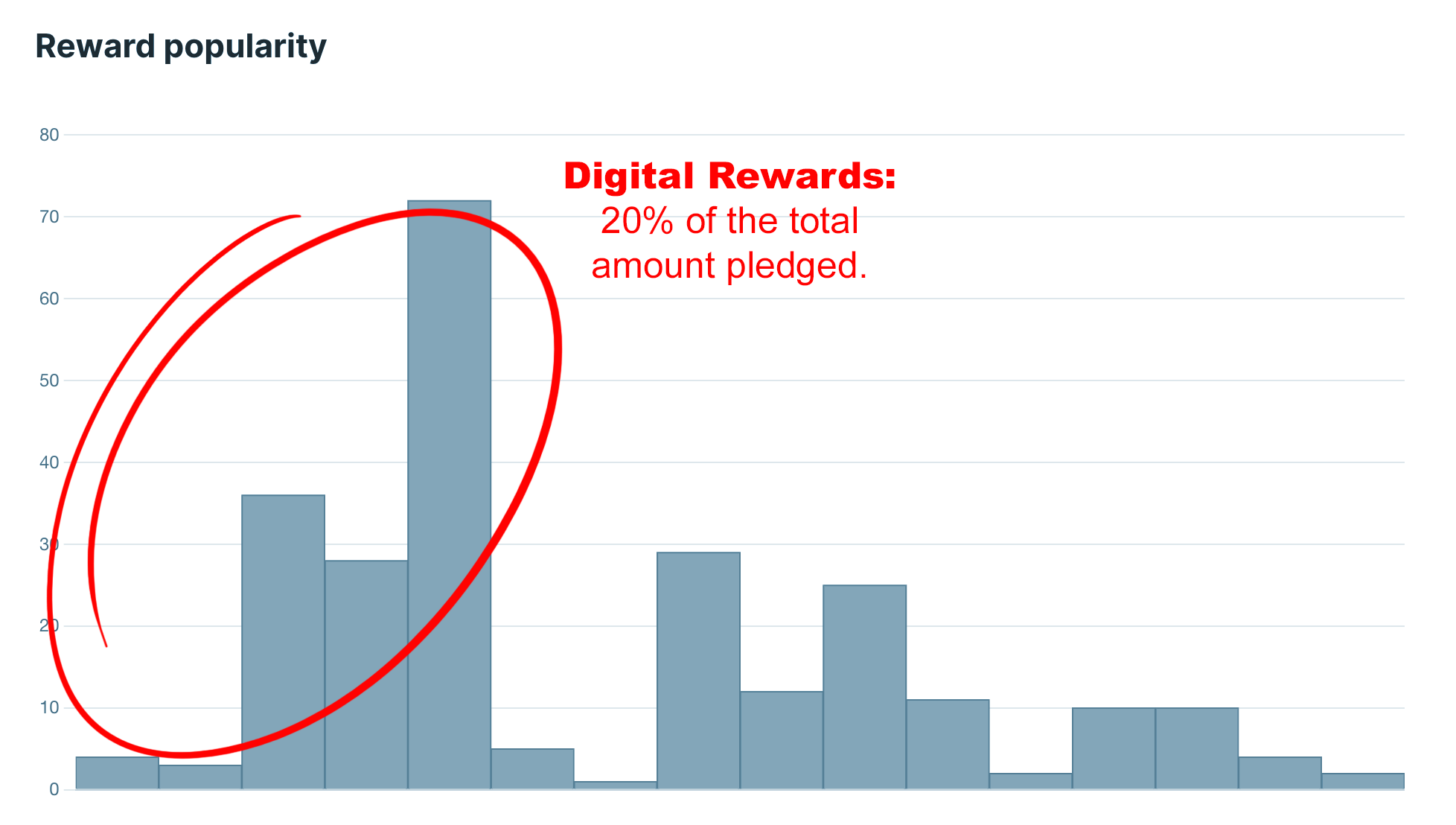
I know the fear. “They’ll like the other person better, and ditch me in favor of them.” That.s not the case. Look at this chart from a content exchange between Javis Ray and me…
I can tell you from experience, I get a lot of new pledges who are continuing their pledge to the other person. (I know, because I always click that button to see who else they’re supporting.) For me, it has been a “rising tide lifts all boats ” situation.
In 2016, I alerted you to Blasty, an app that was designed to help protect your intellectual property on the Web. I endorsed it enthusiastically. Unfortunately, it has come to me attention that it is now defunct.
The content you are trying to access is only available to members.
For years, artists have been requesting the ability to post more than a single image on their Patreon posts. That day has finally come. From Patreon’s blog:
Introducing Image Galleries in posts. Now, whether you’re a visual artist sharing a series of illustrations, or a podcaster sharing photos from a recent event, you can upload as many images as you like to a post, creating a beautiful image gallery with an intuitive viewing experience for your patrons.
According to the site: “When your patrons click on a thumbnail, it will expand into a full-sized light box, displaying your image in vivid detail. Plus, with the arrow button or their keyboard, your patrons will be able to click through the images, and see the rest of your works.”
That’s great news. But it has potential far beyond simply uploading multiple images. Here’s your chance to get ahead of the curve in what you’re offering Patreon backers.
Optimize the comics-reading experience for mobile users
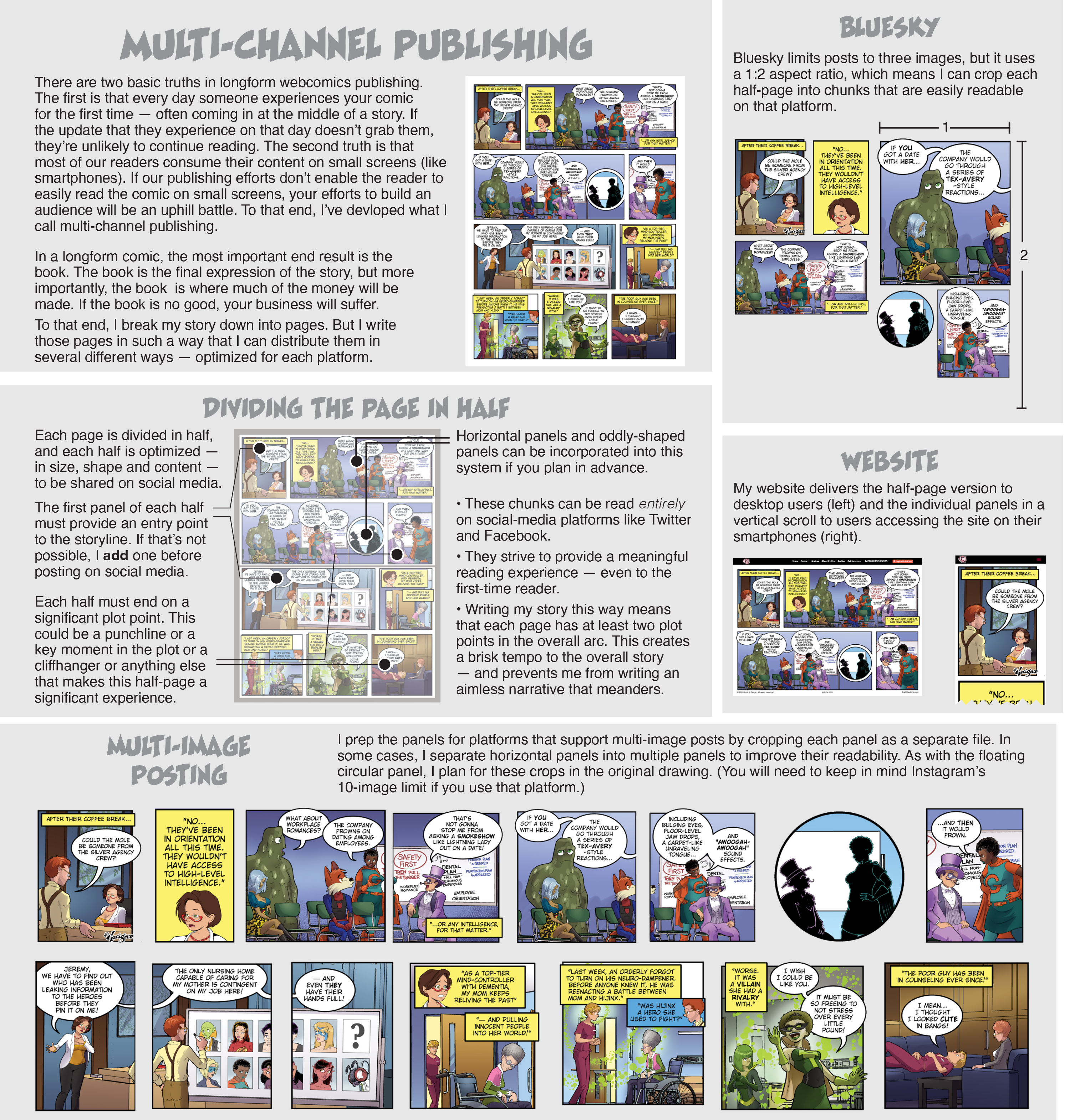
Certainly, this new feature will be good for posting several different images for backers. But it has a second use that is far more practical — especially as the consumption of content veers increasingly towards mobile screens. You can now post your comic in a panel-by-panel format that improves the reading experience on small screens.
If you’re following the Multi-Channel Publishing strategy shared here previously, you’re already prepping your comic in this format for sharing on sites like Instagram and Webtoons. (If not, you now have an additional reason to consider it.
Using these individual panels to post your comic to Patreon backers would give those backers using mobile devises a vastly improved reading experience. Truthfully, you could easily have the best of both worlds. The primary image could be the full, multi-panel comic. This would satisfy overall display aesthetics and the concerns of desktop users. The subsequent images would then be that same comic, divided into a panel-by-panel display.
Better still, you can bulk-upload several images at once with a simple drag-and-drop function. And you can change the sequence of display by dragging an image into its proper position. So, for example, if your panels uploaded as A-C-B, you can click on “C” and drag it into its proper placement after “B.”
Here’s a look at the results, from the screen of my iPhone…
If you’re not sure how many of your Patreon backers are using mobile devices to access your content, this is a great excuse to do a Patreon poll and ask them!
Today’s show is brought to you by Wacom — makers of the incredible Wacom One! This week, Dave and Brad discuss what we should call ourselves — cartoonist, creator, comics artist, or what?