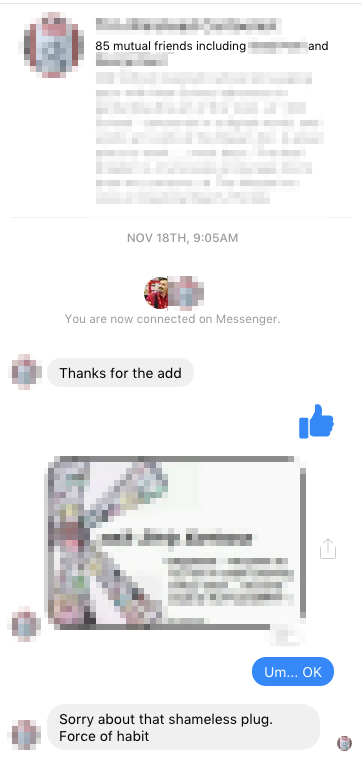
I got a Facebook friend request from a cartoonist, and, as usual, I accepted. Within seconds I got a “thanks for the add” direct message. Friending is not exactly an “add,” but I decided not to split semantic hairs. I sent him a thumbs-up icon as an acknowledgement.
Immediately, he direct-messaged me his business card. (Please read Business Card Etiquette if you haven’t already. It applies to digital business cards, too.)
I unfriended him a few minutes later.
Why? Because he was annoying?
Partly. But mostly I did that for one, important reason…
The importance of aim
Remaining connected to this person on social media was going to mean being on the receiving end of scattershot promotion over a long period of time, and I choose to avoid that. (Psst… so do most people.)
There are two types of social-media promoter — The Scattershot and the Sniper. The Scattershot promoter sprays promotion everywhere — usually without thinking — and hopes that something hits. If you get pelted by a stray shot, they’ll shrug and mumble something about being in the habit of “shameless self-promotion.” You’ll see posts crammed to the gills with generic hashtags. And you’ll see posts pointed (although that’s definitely not the right word) in the darnedest directions. You’ll see cartoonists promoting their Kickstarters on Facebook groups dedicated to… you guessed it, other cartoonists.
You’ll see a one-size-fits-all approach to promotion that’s based on a general understanding of HOW — and a downright tragic ignorance of WHY.
A sniper takes careful aim and takes their shot. Depending on their experience and their attention to detail, they hit their target more often than not.
You should try to be a Sniper. I’m convinced that it’s not only more efficient, but it’s more effective as well.
How to be a sniper
Let’s talk about good social-media promotion habits.
ARE YOU SPAMMY?
Years ago, I wrote a piece on how to determine of your messages are perceived as “spammy.” It stressed understanding the difference between personal interaction channels and impersonal ones. Understanding the difference will make a pronounced difference in how you handle “shameless self-promotion.”
In short, people dislike receiving impersonal messages (promotion) through personal channels. In the example above, the cartoonist used a personal channel (Facebook’s Messenger function) to send me generic promotion (his business card).
This is also why I like using a separate Facebook Page for my comic. My comic’s Facebook Page can be commercial-heavy. And I can be selective about which posts I decide to share on my personal Facebook account.
FOCUS
If your sales pitch is “do you like comics?” then you’ve already lost the game. No one promotes “Harry Potter” by saying “do you like to read?” Focus instead on what makes your comic unique.
Likewise, if your hashtag is #webcomics, you’re also wasting time. That hashtag should be targeted to the subject matter, not the medium. This goes back to the HOW vs WHY argument. WHY are you putting a hashtag on your post? To find new potential readers. What’s the best way to attract a reader? Through subject matter.
Translation: If I were promoting “Harry Potter,” using #books would be brain-dead. Using #magic or #wizard would be better. And #magicboy or #wizardschool could be better yet. Why? Because someone searching for one of those terms would be more likely to stumble upon that post and like what they see. Using #books would be much less efficient.
MESSAGE
Finally, take a little time and craft your message. Figure out what point(s) you want this post to convey and they edit (and re-edit) that post until your message shines through. Then re-read that post for emotion. Are you projecting excitement? You’d darned-well better. If you’re coming across as a sad sack, you’re shooting yourself in the foot. You’re an entertainer. People have enough misery in their own lives. They come to you to alleviate that — not to be loaded down further by yours. And don’t apologize. That comes from fear, and your audience is trained to reject fear. They’re drawn to confidence. Learn how to fake confidence, and you’re halfway home!
Finally, put some thought into your visual. (And there’d better be a visual.) Does it fit the words? Is it engaging? Is it attractive? Can you do better?
Bottom line
Social-media promotion is deceptive. It’s so darned easy, it’s easy to focus on the HOW and forget about the WHY. Spend some time considering WHY you’re doing promotion, and you’ve taken your first step towards being a social-media sniper. And that means better, more effective promotion.